Repository Maintainers
This document outlines the best practices and guidelines for maintainers of the PC2Products repository on GitHub. It covers:
- branch protection
- GitHub Actions workflows
- security features
- branching strategies
Maintainers play a crucial role in ensuring the quality and security of the codebase. Following these guidelines will help to ensure a smooth and secure development process.
Protect Branches
Branch protection rules help us enforce certain workflows in our repository. We can use them to:
- Apply protection to main branch
- Require pull requests before merging
- Require 1 approving review
- Require status checks (CI) to pass before merge
- Dismiss stale approvals when new commits are pushed
- Prevent force pushes and branch deletion (restrict to admins)
- Limit merge types (e.g., enable only squash merges to keep history clean)
Actions
GitHub Actions allow you to automate workflows directly in our repository.
Here is a summary of the workflows in .github/workflows, grouped by trigger type:
Documentation
- mkdocs-gh-pages.yml
- Summary: Zensical validation and deployment workflow for the documentation.
- Trigger: On pull requests and pushes to
mainthat changedocs/,pyproject.tomlor the workflow. - One deployment runs at a time (
concurrency); a newer push waits for the current deployment to finish. - Installs only
docs/files/requirements.txtwith pip, builds with Zensical on pull requests, and also deploys the generateddocs/siteto GitHub Pages on pushes.
Automatic integration tests
- python-integration-tests.yml
- Summary: R environment and workflow integration tests using Pixi and pytest.
- Trigger: On pushes to
mainand pull requests targetingmainthat changeberatools/,tests/,pixi.toml,pixi.lock,pyproject.tomlor the workflow. - On Ubuntu, installs the system GDAL/GEOS/PROJ/udunits libraries, runs
tests/test_r_environment.py(which installs the R packages into the pixi R), thentests/test_workflow.py, both with terminal coverage. The timeout is 60 minutes to leave room for compiling the R packages.
Manual (workflow_dispatch)
- python-compatibility-tests.yml
- Summary: Manual Python compatibility grid using tox inside micromamba environments with conda-forge GDAL.
- Trigger: Manually triggered via
workflow_dispatch. - Runs
tests/test_workflow.pythrough tox under Python 3.12, 3.13, and 3.14.
Configuration
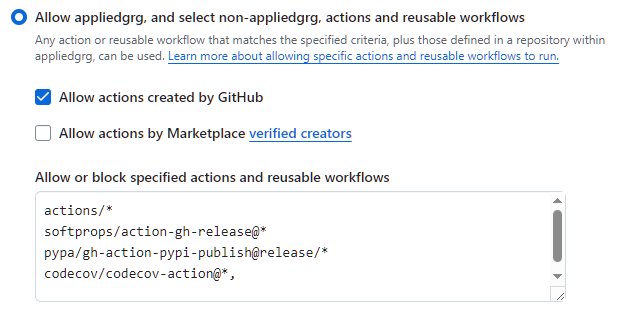
There are security measures in place to restrict actions to be used. Find these in: Repository Settings -> Actions -> General --> Actions permissions:
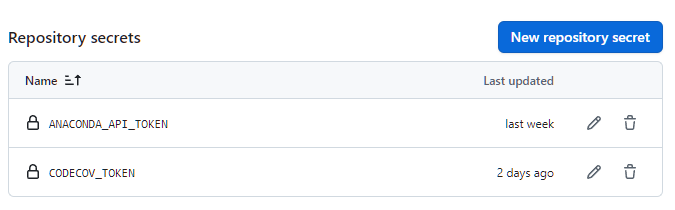
Use repository secrets for sensitive information such as API tokens and credentials required by the workflows. Find these in: Repository Settings -> Secrets and variables -> Actions --> Repository secrets. Secret values must never be added to source control or documentation.
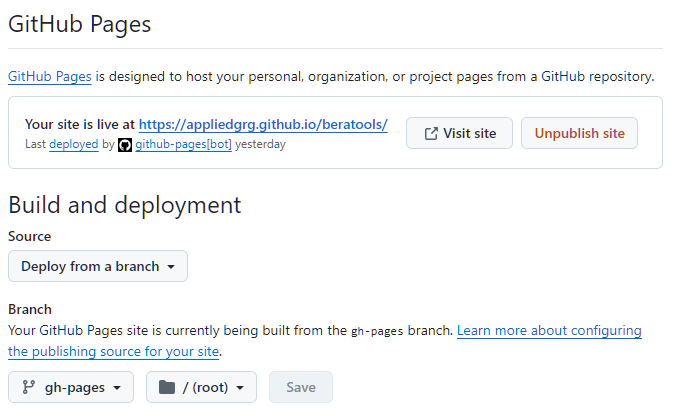
GitHub Pages must be set to deploy from GitHub Actions for the documentation workflow to publish the site:
Actions Flow
flowchart LR
    Start([Code Change]) --> CheckType{Push to GitHub}

    CheckType -->|Push to main| Files{Files changed}
    Files -->|Documentation inputs| Zensical[Build and Deploy Docs]
    Files -->|Code, tests or pixi inputs| IntegrationPush[R Environment and Workflow Tests]

    CheckType -->|PR to main| PR[PR Validation]
    PR --> PRFiles{Files changed}
    PRFiles -->|Documentation inputs| DocsPR[Build Docs]
    PRFiles -->|Code, tests or pixi inputs| IntegrationPR[R Environment and Workflow Tests]

    CheckType -->|Manual trigger| Manual[Workflow Dispatch]
    Manual --> Compatibility[Python Compatibility Matrix]

    classDef push fill:#e1f5ff,stroke:#01579b
    classDef pr fill:#fff3e0,stroke:#e65100
    classDef manual fill:#f3e5f5,stroke:#6a1b9a

    class Zensical,IntegrationPush push
    class DocsPR,IntegrationPR pr
    class Compatibility manual
Secure our repository
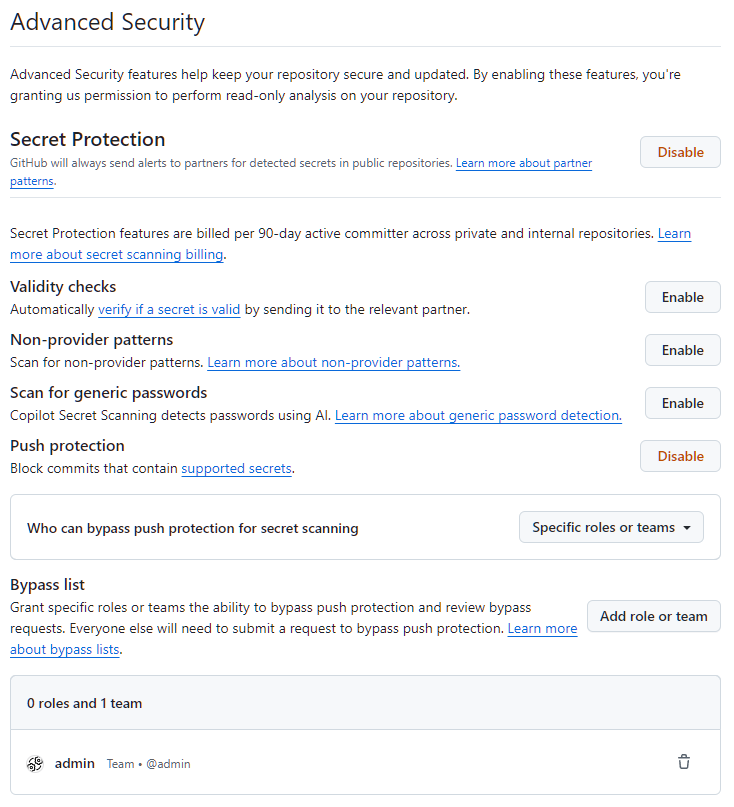
Our repository uses GitHub's available security features to protect our code from vulnerabilities, unauthorized access, and other potential security threats. These features include:
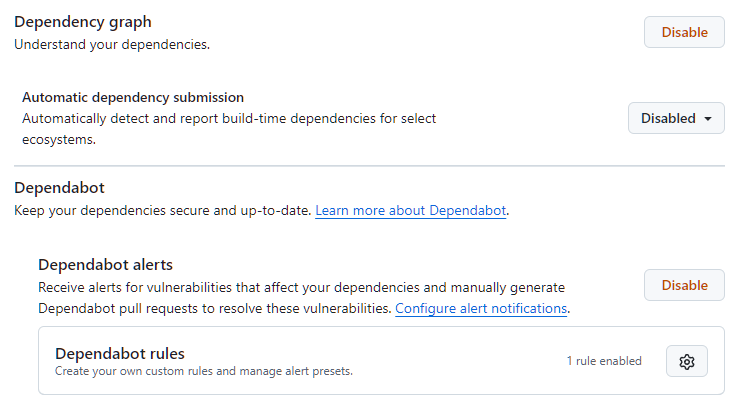
- Dependabot alerts notify of security vulnerabilities in the dependency network, so that we can update the affected dependency to a more secure version.
- Secret scanning scans our repository for secrets (such as API keys and tokens) and alerts us if a secret is found, so that we can remove the secret from our repository.
- Push protection prevents we (and our collaborators) from introducing secrets to the repository in the first place, by blocking pushes containing supported secrets.
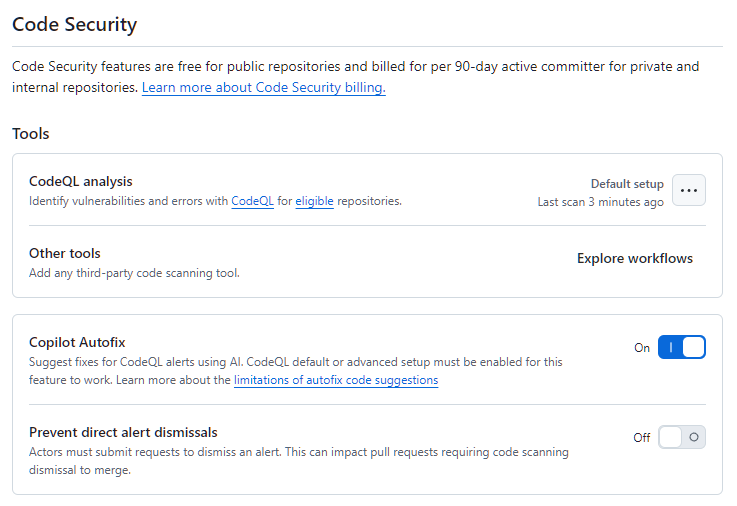
- Code scanning identifies vulnerabilities and errors in our repository's code, so that we can fix these issues early and prevent a vulnerability or error being exploited by malicious actors.
Find these settings in: Repository Settings -> Advanced Security
Branching based workflow
To streamline collaboration, we recommend that regular collaborators work from a single repository, creating pull requests between branches instead of between repositories.
Forking is best suited for accepting contributions from people that are unaffiliated with a project, such as open-source contributors.
To maintain quality of main branch, while using a branching workflow, we use protected branches with required status checks and pull request reviews.