Repository Maintainers
This document outlines the best practices and guidelines for maintainers of the BERA Tools repository on GitHub. It covers:
- branch protection
- GitHub Actions workflows
- security features
- branching strategies
Maintainers play a crucial role in ensuring the quality and security of the codebase. Following these guidelines will help to ensure a smooth and secure development process.
Protect Branches
branch protection rules help us enforce certain workflows in our repository. We can use them to:
- Apply protection to main branch
- Require pull requests before merging
- Require 1 approving review
- Require status checks (CI) to pass before merge
- Dismiss stale approvals when new commits are pushed
- Prevent force pushes and branch deletion (restrict to admins)
- Limit merge types (e.g., enable only squash merges to keep history clean)
Actions
GitHub Actions allow you to automate workflows directly in our repository. BERA Tools uses GitHub Actions for CI/CD pipelines, including:
Here is a summary of the actions defined in all workflow files in .github/workflows, grouped by trigger type:
Push to main
- mkdocs-gh-pages.yml
- Summary: Zensical validation and deployment workflow for documentation inputs.
- Trigger: On pull requests and pushes to
mainaffecting documentation, its dependencies, or the workflow. - Builds with Zensical and deploys the generated artifact to GitHub Pages on pushes.
- Builds once per run; only the deployment job has Pages write and OIDC permissions. Pixi configuration changes also trigger a rebuild.
Automatic integration tests
- python-integration-tests.yml
- Summary: Workflow integration tests using Pixi and pytest.
- Trigger: On pushes to
mainand qualifying pull requests targetingmainwhen application, test, Pixi/project configuration, or workflow files change. - Runs
tests/test_workflow.pyin the Pixi-managed Python 3.12 environment with terminal coverage reporting. - Tests the push commit or PR test-merge commit using the Pixi setup action. The automatic job stays focused on the processing integration test and coverage reporting.
Manual (workflow_dispatch)
-
python-compatibility-tests.yml
- Summary: Manual Python compatibility grid using tox inside micromamba environments with conda-forge GDAL.
- Trigger: Manually triggered via
workflow_dispatch. - Runs
tests/test_workflow.pythrough tox under Python 3.12, 3.13, and 3.14 without relying on Ubuntu apt GDAL. - Installs Python graph bindings as
python-igraphbefore the project's--no-depsinstallation. Run this matrix before releases or after dependency changes.
-
build-win-installer.yml
- Summary: Builds the Windows installer in test or release mode, with signing currently off by default.
- Trigger: Manually triggered via
workflow_dispatchon the selected branch. - With signing enabled and no release tag, uses
test-signingand uploads test-signed Actions artifacts without publishing a GitHub Release. - With a release tag, requires dispatch from
main, validates that the tag's commit belongs to that commit's history, and builds the tagged snapshot. Older tags are allowed. - Skip SignPath is checked by default. Unsigned Actions artifacts are retained; a validated release tag also publishes a
-unsigned.exeasset with unsigned release notes. Uncheck it to userelease-signingand publish a verified signed installer. Signing failures do not activate this option automatically.
-
publish_to_anaconda.yml
- Summary: Builds and smoke-tests Conda packages, publishes eligible releases to Anaconda.org, and attaches test data to GitHub Releases.
- Trigger: Manually triggered via
workflow_dispatchon the selected branch; pushing a version tag does not start this workflow. - With no release tag, runs a non-publishing build and smoke test and uploads the Conda package as an Actions artifact.
- With a release tag, requires dispatch from
mainand builds the tagged source and recipe, including older tags inmain's history. Invalid release requests fail before building.
-
publish_to_pypi.yml
- Summary: Builds and checks PyPI distributions, then publishes eligible manually selected releases.
- Trigger: Manually triggered via
workflow_dispatch; pushing a version tag does not start this workflow. - With no release tag, checks distribution metadata and uploads the packages as a dry-run Actions artifact.
- With a release tag, requires dispatch from
main, builds the tagged snapshot, and verifies both distribution versions. Older tags inmain's history are accepted; invalid release requests fail rather than becoming dry runs.
See Publishing BERA Tools for the signing and release procedure.
The three publishers use native actions/checkout with a qualified refs/tags/... reference when a tag is provided, or the triggering SHA for a blank input. Each workflow validates that selection with a short inline Bash step. Blank inputs disable publication; provided tags must be numeric, dispatched from main, and in that commit's history. Run summaries distinguish the source SHA from the workflow SHA. Release runs are serialized per tag and do not cancel an active upload or signing request.
Configuration
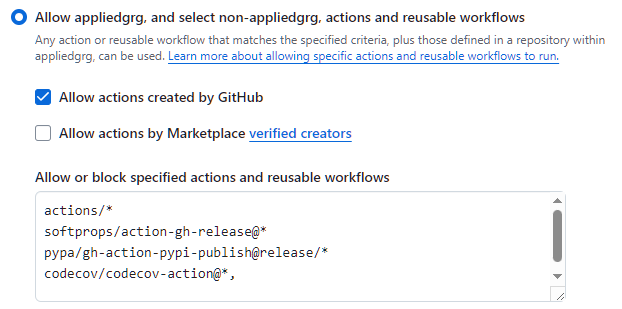
There are security measures in place to restrict actions to be used. Find these in: Repository Settings -> Actions -> General --> Actions permissions:
GitHub has been configured to use repository secrets for sensitive information such as API tokens and credentials required by the workflows. Find these in: Repository Settings -> Secrets and variables -> Actions --> Repository secrets:
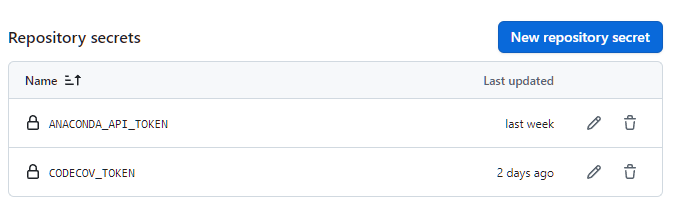
Windows signing requires the SIGNPATH_API_TOKEN and SIGNPATH_ORGANIZATION_ID repository secrets. The SignPath action must also remain allowed under Repository Settings -> Actions -> General -> Actions permissions. Explicit unsigned builds skip SignPath and do not use those secrets. Secret values must never be added to source control or documentation.
PyPI uses trusted publishing for owner BERATool, repository beratools, workflow publish_to_pypi.yml, and no GitHub environment. Update the PyPI publisher registration after a repository transfer.
Actions Flow
flowchart LR
    Start([Code Change]) --> CheckType{Push to GitHub}

    CheckType -->|Push to main| Files{Files changed}
    Files -->|Documentation inputs| Zensical[Deploy Docs]
    Files -->|Integration-workflow inputs| IntegrationPush[Python Integration Tests]

    CheckType -->|PR to main| PR[PR Validation]
    PR --> PRFiles{Files changed}
    PRFiles -->|Integration-workflow inputs| IntegrationPR[Python Integration Tests]

    CheckType -->|Manual trigger| Manual[Workflow Dispatch]
    Manual --> Compatibility[Python Compatibility Matrix]
    Manual --> PackageMode{Release tag supplied?}
    PackageMode -->|No| PackageDryRun[PyPI or Conda dry run artifact]
    PackageMode -->|Yes| PackageTag{Main dispatch and tag in history?}
    PackageTag -->|No| InvalidRelease[Validation failure]
    PackageTag -->|Yes| PackageSource[Checkout tagged snapshot]
    PackageSource --> Anaconda[Conda publication]
    PackageSource --> PyPI[PyPI publication]
    Manual --> InstallerMode{Release tag supplied?}
    InstallerMode -->|No| InstallerTest[Windows Installer Test]
    InstallerTest --> TestSigning{Skip SignPath?}
    TestSigning -->|No| TestSign[SignPath test-signing]
    TestSign --> SignedTest[Signed Actions Artifact]
    TestSigning -->|Yes| UnsignedTest[Unsigned Actions Artifact]
    InstallerMode -->|Yes| InstallerTag{Main dispatch and tag in history?}
    InstallerTag -->|No| InvalidRelease
    InstallerTag -->|Yes| WindowsInstaller[Build tagged Windows Installer]
    WindowsInstaller --> ReleaseSigning{Skip SignPath?}
    ReleaseSigning -->|No| SignPathApproval[SignPath Approval]
    SignPathApproval --> SignedRelease[Signed GitHub Release]
    ReleaseSigning -->|Yes| UnsignedRelease[Explicitly unsigned GitHub Release]

    classDef push fill:#e1f5ff,stroke:#01579b
    classDef pr fill:#fff3e0,stroke:#e65100
    classDef manual fill:#f3e5f5,stroke:#6a1b9a
    classDef rel fill:#e8f5e9,stroke:#2e7d32

    class Zensical,IntegrationPush push
    class Compatibility,PackageMode,PackageTag,PackageSource,PackageDryRun,InstallerMode,InstallerTag,InstallerTest,TestSigning,TestSign,SignedTest,UnsignedTest,InvalidRelease manual
    class IntegrationPR pr
    class Anaconda,PyPI,WindowsInstaller,ReleaseSigning,SignPathApproval,SignedRelease,UnsignedRelease rel
Secure our repository
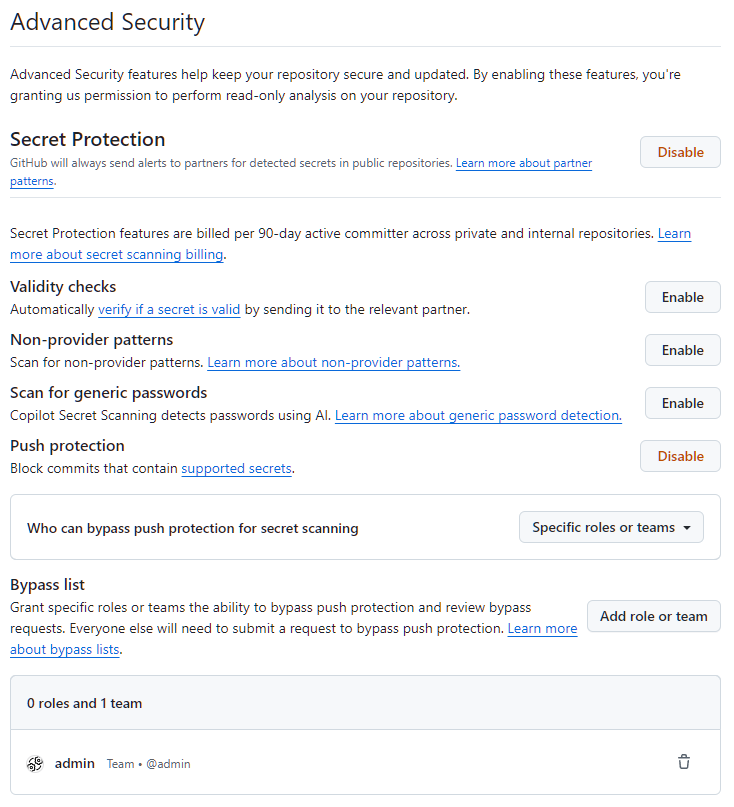
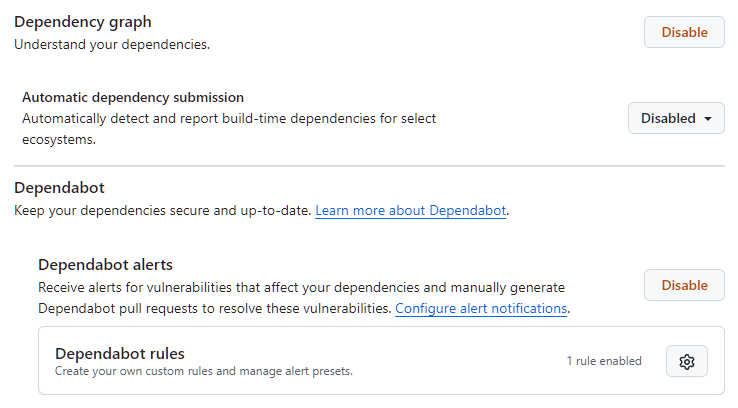
Our repository is using GitHub's available security features to protect our code from vulnerabilities, unauthorized access, and other potential security threats. These features include:
- Dependabot alerts notify of security vulnerabilities in BERA Tools dependency network, so that we can update the affected dependency to a more secure version.
- Secret scanning scans our repository for secrets (such as API keys and tokens) and alerts us if a secret is found, so that we can remove the secret from our repository.
- Push protection prevents we (and our collaborators) from introducing secrets to the repository in the first place, by blocking pushes containing supported secrets.
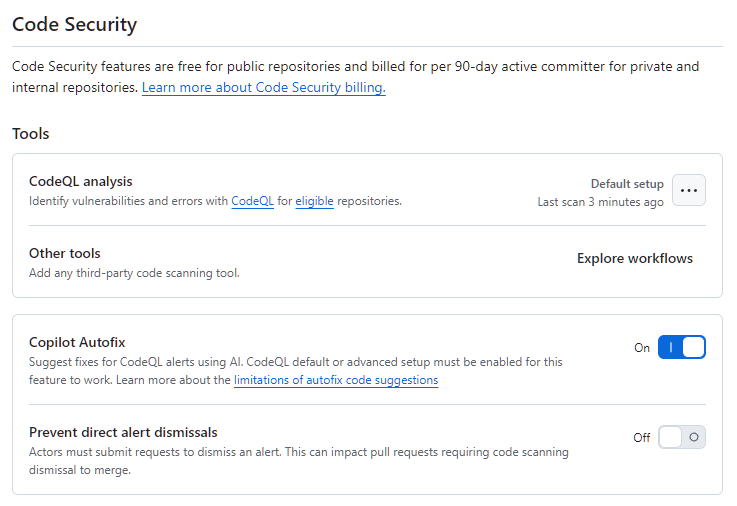
- Code scanning identifies vulnerabilities and errors in our repository's code, so that we can fix these issues early and prevent a vulnerability or error being exploited by malicious actors.
Find these settings in: Repository Settings -> Advanced Security
Branching based workflow
To streamline collaboration, we recommend that regular collaborators work from a single repository, creating pull requests between branches instead of between repositories.
Forking is best suited for accepting contributions from people that are unaffiliated with a project, such as open-source contributors.
To maintain quality of main branch, while using a branching workflow, we use protected branches with required status checks and pull request reviews.